Precision Comparison in PyTorch
Overview
-
This document describes how to compare CPU or GPU precision data with NPU precision data using command lines and comparison functions. Before performing precision comparison, you must first dump the precision data from both the CPU or GPU and the NPU. For details, see Precision Data Collection in PyTorch.
-
msProbe uses the subcommand
compareto perform precision comparison, supporting both single-rank and multi-rank scenarios. -
Comparison functions are executed via a separate precision comparison script, supporting precision data comparison in both single-rank and multi-rank scenarios.
-
The tool's comparison speed depends on data volume. For small volumes (single file under 10 GB), the speed is 0.1 GB/s; for larger volumes, it reaches 0.3 GB/s. An exclusive environment with 192 CPU cores and SSDs (I/O speed > 500 MB/s; HDDs provide only 60–170 MB/s) is recommended. If the user's environment performs below the recommended standard or is not exclusive, the comparison speed may be slower than expected. Comparison speed is calculated as the total size of the two files divided by the comparison time.
Application Scenarios
- The precision of a model decreases when it is ported from a CPU or GPU to an NPU. Faults can be located by comparing API computation values in an NPU with those in a CPU or GPU.
- The precision of a model decreases during each model, framework, or device iteration. Faults can be located by comparing API computation values before and after an iteration.
- In the preceding two scenarios, if there are APIs or modules that cannot be automatically matched, you can manually specify the APIs or modules to be compared to customize the mapping.
Precautions
- For some NPU APIs that do not have corresponding APIs on a CPU or GPU, their dump data is not compared.
- Calculation discrepancies between the NPU and CPU/GPU might accumulate over the course of model execution, leading to situations where the same API cannot be compared due to significant differences in input data.
- Identical APIs in the CPU/GPU and NPU might have differing calling counts, resulting in inability to compare or mismatched comparisons. However, this does not impact the overall operation, hence such APIs can be disregarded.
API Matching Conditions
During precision comparison, determine whether the CPU or GPU API can be compared with the NPU API. The following matching conditions must be met:
- The names of the two APIs are identical. The API naming convention is:
{api_type}.{api_name}.{number_of_api_calls}.{forward/backward}.{input/output}.{index}, for example,Functional.conv2d.1.backward.input.0. - The number of input and output tensors for the two APIs is the same.
Generally, if these two conditions are satisfied, the tool will consider them the same API, successfully perform API matching, and proceed with subsequent calculations.
Preparations
Environment Setup
Install msProbe by referring to msProbe Installation Guide.
Constraints
Only the PyTorch scenario is supported.
Model Precision Comparison
Function
Use the command line tool to compare precision data and output the comparison result.
Precautions
Syntax
Parameters
| Parameter | Description | Mandatory (Yes/No) |
|---|---|---|
-tp or --target_path |
dump.json path in the NPU environment (single-rank scenario) or dump directory (multi-rank scenario). The value is a string. |
Yes |
-gp or --golden_path |
dump.json path in the CPU, GPU, or NPU environment (single-rank scenario) or dump directory (multi-rank scenario). The value is a string. |
Yes |
-o or --output_path |
Directory for storing the comparison result file. By default, an output directory is created in the current directory. The value is a string. The file name is automatically generated based on the timestamp in the format of compare_result_{timestamp}.xlsx.Note: Files with the same name as the result file in the output directory will be deleted and overwritten. |
No |
-fm or --fuzzy_match |
Fuzzy matching. After this function is enabled, APIs at the same level on the network with the same name but different number of calls can be matched and compared. This function can be enabled by directly configuring this parameter. By default, this parameter is not configured, indicating that the function is disabled. | No |
-dm or --data_mapping |
Custom mapping for comparison. You need to specify a custom mapping file in .yaml format. For details about the format of the custom mapping file, see Data Mapping. This parameter needs to be configured only in the scenario where APIs and modules cannot be automatically matched. Only rank-by-rank comparison is supported. | No |
-cm or --cell_mapping |
Module comparison across different platforms and configurations. If this parameter is configured, module comparison across different platforms and configurations is enabled. You can specify a custom mapping file in .yaml format. If no mapping file is specified, the mapping-based comparison is not performed. For details about the format of the custom mapping file, see Cell Mapping. This parameter needs to be configured only in the scenario of module comparison across different platforms and configurations. | No |
-da or --diff_analyze |
Automatically identifies the first different node on the network and supports dump data such as MD5 and statistics. Single-rank and multi-rank scenarios are supported. This function can be enabled by directly configuring this parameter. By default, this parameter is not configured, indicating that the function is disabled. | No |
-tensor_log or --is_print_compare_log |
Whether to enable log printing for a single module or API. Only the tensor data dumped by msProbe is supported. This function can be enabled by directly configuring this parameter. By default, this parameter is not configured, indicating that the function is disabled. | No |
--consistent_check |
Whether to enable verl training and inference consistency comparison. This function can be enabled by directly configuring this parameter. By default, this parameter is not configured, indicating that the function is disabled. This parameter needs to be configured only in the scenario of verl training and inference consistency comparison. | No |
| --backend | Training backend specified during verl training and inference consistency comparison. The value can be fsdp or megatron. --consistent_check must be configured first. If --consistent_check is not configured, --backend does not take effect. |
No |
Examples
Network-wide Comparison
This scenario includes comparison of API computation values in an NPU environment with those in a CPU or GPU environment and comparison of API computation values in one model with different iterations.
Both single-rank and multi-rank scenarios are supported. The dump data of multiple ranks can be compared at the same time. In multi-server scenarios, you need to perform the comparison operation on each server separately.
-
Dump the CPU, GPU, and NPU precision data by referring to Precision Data Collection in PyTorch.
-
Example command:
Single-rank scenario:
Multi-rank scenario (-tp and gp need to be set to the step level, that is, the upper level of rank):
- View the comparison results by referring to Precision Comparison Result Analysis.
APIs and Modules Cannot Be Automatically Matched
If there are APIs and modules that cannot be automatically matched, you can provide a configuration file with custom mappings to inform the tool of the APIs or modules that can be matched for comparison.
-
In the config.json file, set
leveltoL0orL1, settasktotensororstatistics, and specify the name of the API or module whose data needs to be dumped. -
Dump the CPU, GPU, and NPU precision data by referring to Precision Data Collection in PyTorch.
-
Run the following command:
msprobe compare -tp /target_dump/dump.json -gp /golden_dump/dump.json -o ./output -dm data_mapping.yaml
For details about how to configure the data_mapping.yaml file, see Data Mapping.
Fuzzy match (-fm) is not supported in this scenario.
- View the comparison results by referring to Precision Comparison Result Analysis.
Module Comparison Across Different Platforms and Configurations
-
In the config.json file, set
leveltoL0andtasktotensororstatistics. -
Dump the CPU, GPU, and NPU precision data by referring to Precision Data Collection in PyTorch.
-
Run the following example command to perform the comparison.
msprobe compare -tp /target_dump/dump.json -gp /golden_dump/dump.json -o ./output -cm cell_mapping.yaml
For details about how to configure the cell_mapping.yaml file, see Cell Mapping.
First Mismatched Operator Node Identification
In this scenario, the first mismatched operator node with precision issues is identified by analyzing the data saved by msprobe dump in the XPU and NPU environments.
Single-rank and multi-rank scenarios are supported. The dump data of multiple ranks can be compared at the same time.
Procedure:
- In the config.json file, set
leveltoL0orL1, settasktotensororstatistics(or setsummary_modetomd5), and specify the name of the API or module whose data needs to be dumped. - Dump the CPU, GPU, and NPU precision data by referring to Precision Data Collection in PyTorch.
- Run the following command: Single-rank scenario:
Multi-rank scenario (-tp and gp need to be set to the step level, that is, the upper level of rank):
-
View the comparison results. The
compare_result_rank{rank_id}_{timestamp}.jsonanddiff_analyze_{timestamp}.jsonfiles are generated in the specified output directory.-
Directory structure
-
compare_result_rank{rank_id}_{timestamp}.jsoncontains the rank comparison result, including the API or module name, comparison status, and comparison metrics. diff_analyze_{timestamp}.jsoncontains the identification result of the first mismatched operator node, including the operator node name, operator type, and operator location.
-
verl Training and Inference Consistency Comparison
In this scenario, thr training and inference data in the prefill phase of verl is compared.
[!NOTE]NOTE
- Currently, the L0 comparison of tensor data dumped by FSDP and Megatron backends is supported. The supported models include Qwen3-30B, Qwen3-32B, Qwen3-4B, and Qwen2.5-0.5B.
- In this scenario, both training and inference data need to be dumped. Ensure that the dump paths for the two types of data are different; otherwise, the dump data will be overwritten. During comparison,
-tpmust be set to training data, and-gpmust be set to inference data.- For details about verl, see the official verl repository.
-
Preprocess your model and dump the training and inference precision data by referring to Collecting Data for Verifying Data Consistency Between verl Training and Inference Based on FSDP and Collecting Data for Verifying Data Consistency Between verl Training and Inference Based on Megatron.
-
Example command:
Single-rank scenario:
msprobe compare -tp /train_dump/dump.json -gp /infer_dump/dump.json --consistent_check --backend fsdp -o ./output
Multi-rank scenario:
msprobe compare -tp /train_dump/step0 -gp /infer_dump/step0 --consistent_check --backend fsdp -o ./output
Considering the randomness of data splitting during training and inference in the multi-rank verl scenario, the training and inference dump data may be unevenly distributed across different ranks. In this case, single-rank comparison must be used. If the training and inference dump data on each rank is in one-to-one correspondence, you can directly specify the rank parent directory (step level) for multi-rank comparison.
- View the comparison results by referring to Precision Comparison Result Analysis.
Single-Point Data Comparison in Dynamic Graphs
Applicable scenario: compare data saved at a single point in the CPU or GPU and NPU environment.
Single-point data comparison supports single-rank and multi-rank comparison. In multi-server scenarios, you need to perform the comparison operation on each server separately.
-
Collect single-point data in dynamic graphs of the CPU or GPU and NPU by referring to Single-Point Saving Tool.
-
Example command:
Single-rank scenario:
Multi-rank scenario (-tp and gp need to be set to the step level, that is, the upper level of rank):
- View the comparison results by referring to Precision Comparison Result Analysis.
Tensor Postprocessing
In some scenarios (such as quantization-aware training), the dumped tensor is the dequantized result rather than the original tensor. For example, the dequantization process right-multiplies the original tensor by a rotation matrix, causing a systematic deviation between the dumped tensor and the baseline tensor.
To restore the original tensor for precision comparison, a tensor postprocessing step can be inserted into the comparison pipeline. This step right-multiplies the dumped tensor of specified operators by a calibration tensor (such as the inverse of the rotation matrix) to cancel the rotation effect.
[!NOTE]
Tensor postprocessing takes effect only in real data mode (i.e.,
taskis set to"tensor"inconfig.jsonduring dump). It does not take effect in statistics mode or MD5 mode.
Configuration:
- Run the following command to find the msprobe installation path:
- Open the right_matmul.yaml configuration file (under the msprobe installation path), and configure the calibration tensor path (absolute paths only) and the corresponding operator
data_nameto be postprocessed intarget_tensor_mapand/orgolden_tensor_map.
The calibration tensor file supports .pt and .npy formats.
Example configuration:
mode: right_matmul
target_tensor_map:
  "/home/user/calib/to_scale.pt":
    - "Tensor.to.0.forward.input.0.pt"
    - "Tensor.to.1.forward.input.0.pt"
  "/home/user/calib/to_offset.pt":
    - "Add.0.forward.output.0.pt"
golden_tensor_map:
  "/home/user/calib/to_scale.npy":
    - "Tensor.to.0.forward.input.0.pt"
  "/home/user/calib/to_offset.npy":
    - "Add.0.forward.output.0.pt"
For more configuration details, see the comments in right_matmul.yaml.
-
Refer to PyTorch Data Dump to dump precision data on CPU or GPU and NPU.
-
Run the comparison command (no additional parameters required; the tool automatically loads the postprocessing configuration).
-
View the comparison results by referring to Precision Comparison Result Analysis.
Output Description
After the comparison is complete, the message msprobe compare ends successfully. is displayed.
-
Single-rank scenario: An .xlsx file is generated in the configured output path. The file name is automatically generated based on the timestamp in the format of
compare_result\_{timestamp}.xlsx. -
Multi-rank scenario: Multiple .xlsx files are generated in the configured output path. The file name is automatically generated based on the timestamp in the format of
compare_result_rank{rank_id}_{timestamp}.xlsx. -
First mismatched operator node identification scenario:
Saving json file to disk: /output_path/compare_result_rank{rank_id}\_{timestamp}.json and The analyze result is saved in: /output_path/diff_analyze\_{timestamp}.json are displayed when the identification is complete.
Multiple .json files are generated in the configured output path. The file names are automatically generated based on the timestamp in the format of compare_result_rank{rank_id}\_{timestamp}.json and diff_analyze_{timestamp}.json.
- Single-point data comparison in dynamic graphs:
An .xlsx file is generated in the configured output path. The file name is automatically generated based on the timestamp in the format of debug_compare_result_(rank_id/proc_id)_{timestamp}.xlsx.
Output File Description
Precision Comparison Result Analysis
PyTorch precision comparison uses the CPU or GPU computation result as the benchmark to determine whether APIs have precision issues based on precision evaluation metrics.
The compare_result_{timestamp}.xlsx file lists the details and comparison results of all APIs on which precision comparison is performed. Examples:



Note: In the comparison result file, you can identify suspicious operators by checking the comparison result (Result) and error messages (Err_Message). However, since each metric has its own evaluation criteria, make judgments based on actual circumstances.
Metric Description
API precision can be evaluated in three modes: real data mode, statistics mode, and MD5 mode. The comparison results of these modes have different table headers.
The three modes indicate different types of collected data. For details about data collection, see Precision Data Collection in PyTorch.
Real data mode: During data collection, the task field in the config.json file is set to tensor, and flushed statistics and full tensors are collected.
Statistics mode: During data collection, the task field in the config.json file is set to statistics, and the summary_mode field is set to statistics. Only flushed statistics are collected.
MD5 mode: During data collection, the task field in the config.json file is set to statistics, and the summary_mode field is set to md5. Only flushed statistics and MD5 values are collected.
Common table headers:
| Data Dump Mode | NPU Name (NPU API Name) | Bench Name (Bench API Name) | NPU Dtype (NPU Data Type) | Bench Dtype (Bench Data Type) | NPU Tensor Shape | Bench Tensor Shape | NPU Requires_grad (Gradient Computation for NPU Tensors) | Bench Requires_grad (Gradient Computation for Bench Tensors) |
|---|---|---|---|---|---|---|---|---|
| Real data mode | √ | √ | √ | √ | √ | √ | √ | √ |
| Statistics mode | √ | √ | √ | √ | √ | √ | √ | √ |
| MD5 mode | √ | √ | √ | √ | √ | √ | √ | √ |
Customized table headers:
There are four types of statistics: maximum value (max), minimum value (min), mean, and L2 norm.
| Data Dump Mode | Cosine (Tensor Cosine Similarity) | EucDist (Tensor Euclidean Distance) | MaxAbsErr (Tensor's Max. Absolute Error) | MaxRelativeErr (Tensor's Max. Relative Error) | One Thousandth Err Ratio | Five Thousandth Err Ratio | Absolute Error Diff Between NPU and Bench Statistics (max, min, mean, L2 norm) | RelativeErr Between NPU and Bench Statistics (max, min, mean, L2 norm) | NPU and Bench Statistics (max, min, mean, L2 norm) | NPU MD5 (NPU Data CRC-32 Value) | BENCH MD5 (Bench Data CRC-32 Value) | Requires_grad Consistent | Result | Err_message | NPU_Stack_Info | Data_Name ([NPU Real Data, Bench Real Data]) |
|---|---|---|---|---|---|---|---|---|---|---|---|---|---|---|---|---|
| Real data mode | √ | √ | √ | √ | √ | √ | √ | √ | √ | √ | √ | √ | ||||
| Statistics mode | √ | √ | √ | √ | √ | √ | √ | |||||||||
| MD5 mode | √ | √ | √ | √ | √ | √ |
Comparison Metric Calculation Formulas
$N$: NPU tensor
$B$: Bench tensor
RE (relative error): $\vert\frac {N-B} {B}\vert$
Real data mode:
Cosine: $\frac {{N}\cdot{B}} {{\vert\vert{N}\vert\vert}_2{\vert\vert{B}\vert\vert}_2}$
EucDist: ${\vert\vert{A-B}\vert\vert}_2$
MaxAbsErr: $max(\vert{N-B}\vert)$
MaxRelativeErr: $max(RE)$
One Thousandth Err Ratio: $\frac {\sum\mathbb{I}(RE<0.001)} {size(RE)}$
Five Thousandth Err Ratio: $\frac {\sum\mathbb{I}(RE<0.005)} {size(RE)}$
Statistics mode:
Max diff: $max(N)-max(B)$
Min diff: $min(N)-min(B)$
Mean diff: $mean(N)-mean(B)$
L2 Norm diff: $l2norm(N)-l2norm(B)$
MaxRelativeErr: $\vert\frac{max(N)-max(B)}{max(B)}\vert*100\%$
MinRelativeErr: $\vert\frac{min(N)-min(B)}{min(B)}\vert*100\%$
MeanRelativeErr: $\vert\frac{mean(N)-mean(B)}{mean(B)}\vert*100\%$
NormRelativeErr: $\vert\frac{l2norm(N)-l2norm(B)}{l2norm(B)}\vert*100\%$
Comparison Result
Comparison results are classified into three types: pass, warning, and error. The priority is error > warning > pass.
The Err_message column displays comparison error messages, including:
Errors:
- (Real data/Statistics mode) The maximum or minimum NPU value of an API or module contains
nan,inf, or-inf. If the same phenomenon occurs in Bench metrics, ignore this error. - (Real data mode)
One Thousandth Err Ratioof an API or module'sinput/parametersis greater than 0.9 andoutputis less than 0.6. (Only the output is marked, and the input is used for calculation.) - (Statistics mode) The relative error of the norm value of an API or module's
inputis less than 0.1, and that ofoutputis greater than 0.5. (Only the output is marked, and the input is used for calculation.) - (Real data/Statistics mode)
Requires_grad(for gradient calculation) of an API or module is inconsistent. - (Real data/Statistics mode) Non-tensor scalars of an API or module are inconsistent.
- (MD5 mode) The CRC-32 value of an API or module is inconsistent.
- (Real data/Statistics mode)
dtypeof an API or module is inconsistent. - (Real data/Statistics mode) The shape of an API or module is inconsistent.
Warnings:
- (Statistics mode) The relative error of the norm value of an API or module's
outputis 10 times that ofinputorparameters. (Only the output is marked, and the input is used for calculation.) - (Real data mode) The cosine of an API or module's
input/parametersis greater than 0.9 and the difference betweeninput/parametersandoutputis greater than 0.1. (Only the output is marked, and the input is used for calculation.) - (MD5 mode) The parameters of an API or module do not match.
Special scenarios:
- The metric rules that involve using the input for calculation are not applicable to API inputs with placeholders, including
['_reduce_scatter_base', '_all_gather_base', 'all_to_all_single', 'batch_isend_irecv']. - All metrics are not applicable to redundant APIs, including
['empty', 'empty_like', 'numpy', 'to', 'setitem', 'empty_with_format', 'new_empty_strided', 'new_empty', 'empty_strided'].
Precision Evaluation Metrics Analysis
-
Cosine: Cosine similarity measures the similarity between two vectors, where a value approaching 1 indicates greater similarity. The acceptance threshold is greater than 0.99. NaN values may occur during computation, mainly because one of the vectors may be 0. -
EucDist: Euclidean distance measures the similarity between two vectors, defined as the absolute distance between two points in a multi-dimensional space. A value closer to 0 indicates greater tensor similarity, while a larger value indicates a greater difference. -
MaxAbsErr: A maximum absolute error closer to 0 indicates a smaller computation error. The acceptable threshold is less than 0.001. -
MaxRelativeErr: A maximum relative error closer to 0 indicates a smaller computation error.
If the dump data contains 0 or NaN, it is normal that the maximum relative error in the comparison result is inf or NaN.
One Thousandth Err Ratio(proportion of elements with a relative error less than 0.1%) andFive Thousandth Err Ratio(proportion of elements with a relative error less than 0.5%): percentage of elements in the NPU's tensor for which the relative error, when compared element-wise against the corresponding benchmark data, is less than 0.1% and less than 0.5%, respectively. These two metrics are used only as a reference for the precision degradation trend and are not used to determine whether the precision meets the requirements.
Multi-Rank Data Aggregation
Function
This function extracts and summarizes communication operator data from the comparison results in multi-rank comparison scenarios, and outputs a sorted multi-rank precision comparison table for communication operators.
Application scenario:
The precision comparison has been completed, and the multi-rank precision comparison result has been obtained. However, the communication operator data is distributed in multiple result files, which is inconvenient for analyzing precision issues. This function can be used to aggregate multi-rank communication operator data, reducing the time required for fault locating.
Precautions
MD5 comparison results are not supported.
Syntax
Parameters
| Parameter | Description | Mandatory (Yes/No) |
|---|---|---|
-i or --input_dir |
Directory for storing multi-rank comparison results, that is, the output directory of the comparison results generated by compare. The value is of the string type. All comparison results must be either actual data comparison results or statistical data comparison results; otherwise, the aggregated data may be incomplete. |
Yes |
-o or --output_dir |
Directory for storing the data extraction and aggregation results. The value is of the string type. The file name is automatically generated based on the timestamp in the format of multi_ranks_compare_merge_{timestamp}.xlsx.Note: Files with the same name as the result file in the output directory will be deleted and overwritten. |
Yes |
-config or --config-path |
Path of the YAML file that specifies the APIs whose data needs to be aggregated and comparison metrics. The value is of the string type. For details about the file, see YAML File Description below. |
Yes |
YAML File Description
The following uses the config.yaml file as an example:
api:
- Distributed.all_reduce
- Distributed.all_gather_into_tensor
compare_index:
- Max diff
- L2norm diff
- MeanRelativeErr
| Parameter | Description |
|---|---|
api |
Name of the API or module whose data is to be aggregated. If this parameter is not set, the tool displays an error message. The API name format is {api_type}.{api_name}.{number_of_api_calls}.{forward/backward}.The preceding four fields must be configured in sequence. You can configure them in the following combinations: {api_type}{api_type}.{api_name}{api_type}.{api_name}.{number_of_api_calls}{api_type}.{api_name}.{number_of_api_calls}.{forward/backward}api here refers to an API or module. |
compare_index |
Comparison metric to be aggregated. The value of compare_index must be a subset of the comparison metrics corresponding to dump_mode. If this parameter is not set, the tool automatically extracts all comparison metrics corresponding to dump_mode based on the comparison results for aggregation.Comparison metrics in statistics mode: Max diff, Min diff, Mean diff, L2norm diff, MaxRelativeErr, MinRelativeErr, MeanRelativeErr, NormRelativeErr, and Requires_grad ConsistentComparison metrics in real data mode: Cosine, EucDist, MaxAbsErr, MaxRelativeErr, One Thousandth Err Ratio, Five Thousandth Err Ratio and Requires_grad Consistent |
Example
Output Description
An .xlsx file is generated in the configured output path. The file name is automatically generated based on the timestamp in the format of multi_ranks_compare_merge_{timestamp}.xlsx.
Output File Description
The multi-rank data aggregation result is as follows:

NPU Nameindicates the name of an API or module.rank*contains multi-rank data.- Data of different comparison metrics is displayed on different sheets.
- If no API or module data is found on a rank, the aggregation result will be blank.
- If the comparison metric value is
N/A,unsupportedorNaN, the comparison metric value cannot be calculated. In this case, the aggregation result will be displayed asNPU: NPU Max. value Bench: Bench Max. value. - In the example shown in the figure,
NPU:N/AandBench:N/Aindicate that the output isNone.
To view group data based on group information, perform the following steps:
Take Distributed.all_reduce.0.forward as an example. This API performs a multi-rank data reduction operation and outputs the result within a group. The output within the same group is consistent.
In this API, ranks 0 to 3 form a group, which is displayed as tp-0-1-2-3 for Distributed.all_reduce.0.forward.input.group and the output of ranks 0 to 3 is consistent. Ranks 4 to 7 form another group, which is displayed as tp-4-5-6-7, and the output of ranks 4 to 7 is consistent.
In addition to this format, a group can also be presented in the form of [0, 1, 2, 3].
Expected results of common communication APIs:
Distributed.all_gather: multi-rank data aggregation. The input of each rank can be different, but the output within the same group is consistent. The output is a tensor list.Distributed.all_gather_into_tensor: multi-rank data aggregation. The input of each rank can be different, but the output within the same group is consistent. The output is a tensor.Distributed.all_reduce: multi-rank data reduction operation. The input of each rank can be different, but the output within the same group is consistent. The output is the reduction result.Distributed.reduce_scatter: multi-rank data reduction operation. The input of each rank can be different, and the output is different parts of the reduction result within the group. The input is a tensor list.Distributed.reduce_scatter_tensor: multi-rank data reduction operation. The input of each rank can be different, and the output is different parts of the reduction result within the group. The input is a tensor.Distributed.broadcast: The input is the data to be broadcast, and the output is the broadcast data.Distributed.isend: point-to-point communication. The input is the data to be sent, and the output is the sent data.Distributed.irecv: point-to-point communication. The input is the original data, and the output is the received new data.Distributed.all_to_all_single: The output data is the result of data splitting and merging on all ranks.
Appendixes
Data Mapping
The file name is the format of .yaml. The asterisk (*) indicates the file name, which can be customized.
File content format:
# API
{api_type}.{api_name}.{number_of_api_calls}.{forward/backward}.{input/output}.{parameter_index}: {api_type}.{api_name}.{number_of_api_calls}.{forward/backward}.{input/output}.{parameter_index}
# Module
{Module}.{module_name}.{forward/backward}.{index}.{input/output}.{parameter_index}: {Module}.{module_name}.{forward/backward}.{index}.{input/output}.{parameter_index}
The left and right sides of the colon (:) represent API and module names from different versions of the PyTorch framework or different chip environments, respectively.
You can obtain the API and module names from the dump.json file in Precision Data Collection in PyTorch.
The following is an example of the file content:
# API
NPU.npu_fusion_attention.4.forward.input.0: NPU.npu_fusion_attention.4.forward.input.0
# Module
Module.module.language_model.embedding.word_embedding.VocabParallelEmbedding.forward.0.input.0: Module.module.language_model.embedding.word_embedding.VocabParallelEmbedding.forward.0.input.0
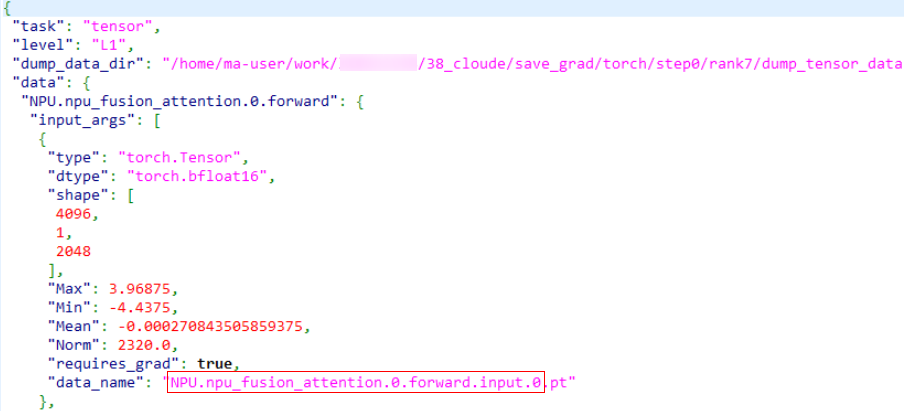
If the dump.json file contains the data_name field, the API and module names are the data_name field with the file name extension removed, as shown in the red box in the following figure.
If the dump.json file does not contain the data_name field, the naming rules are as follows:
The naming rules for input_args, input_kwargs, and output are the same. If the value is of the list type, add .{index} to the end of the name. If the value is of the dict type, add .{key} to the end of the name. If the value is a specific tensor, null, int, float, bool, or an empty list/dict, the naming ends.
The following uses an API dump file as an example:
  "Functional.max_pool2d.0.forward": {
   "input_args": [
    {
     "type": "torch.Tensor",
     "dtype": "torch_float32",
     "shape": [
      1,
      64,
      14,
      14
     ],
     "Max": xxx,
     "Min": xxx,
     "Mean": xxx,
     "Norm": xxx,
     "requires_grad": true
    },
    {
     "type": "int",
     "value": 3
    },
    {
     "type": "int",
     "value": 2
    },
    {
     "type": "int",
     "value": 1
    },
    {
     "type": "int",
     "value": 1
    }
   ],
   "input_kwargs": {
    "ceil_mode": {
     "type": "bool",
     "value": false
    },
    "return_indices": {
     "type": "bool",
     "value": false
    },
   },
   "output": [
    {
     "type": "torch.Tensor",
     "dtype": "torch.float32",
     "shape": [
     1,
     64,
     7,
     7
     ],
     "Max": xxx,
     "Min": xxx,
     "Mean": xxx,
     "Norm": xxx,
     "requires_grad": true
    }
   ]
  }
The initial name is Functional.max_pool2d.0.forward. input_args is a list with a length of 5. The 0th item is followed by Tensor, and the naming ends. The 1st to 4th items are followed by int, and the naming ends. According to the naming rules, the following names can be obtained:
Functional.max_pool2d.0.forward.input.0
Functional.max_pool2d.0.forward.input.1
Functional.max_pool2d.0.forward.input.2
Functional.max_pool2d.0.forward.input.3
Functional.max_pool2d.0.forward.input.4
input_kwargs is a dict. The keys are ceil_mode and return_indices, and the values are bool The naming ends.
Functional.max_pool2d.0.forward.input.ceil_mode
Functional.max_pool2d.0.forward.input.return_indices
output is a list with a length of 1, the 0th item is followed by Tensor, and the naming ends. According to the naming rules, the following name can be obtained:
In conclusion, the generated op_name is
Functional.max_pool2d.0.forward.input.0
Functional.max_pool2d.0.forward.input.1
Functional.max_pool2d.0.forward.input.2
Functional.max_pool2d.0.forward.input.3
Functional.max_pool2d.0.forward.input.4
Functional.max_pool2d.0.forward.input.ceil_mode
Functional.max_pool2d.0.forward.input.return_indices
Functional.max_pool2d.0.forward.output.0
Cell Mapping
The file name is the format of \*.yaml. The asterisk (*) indicates the file name, which can be customized.
The content of the mapping file can be defined in two formats: mapping by module name and mapping by string in the module name.
The two formats can be configured in the same file. If both formats are configured for the same module, mapping by module name is used.
Mapping by Module Name
Extract {module_name}.{class_name} for mapping, as shown below:
{module_name}.{class_name} on the left side of the colon represents a module in the NPU environment, and {module_name}.{class_name} on the right side of the colon represents a module in the CPU, GPU, or NPU environment.
- Obtain
{module_name}.{class_name}from the name of the module-level dump file (.npy). The naming format is:
Module.{module_name}.{class_name}.{forward/backward}.{index}.{input/output}.{parameter_index/parameter_name}
Or
Module.{module_name}.{class_name}.parameters_grad.{parameter_name}
The following is an example of the file content:
Mapping by String in the Module Name
Extract any string from {module_name}.{class_name} for mapping, as shown below:
The following is an example of the file content:
MindSpeedTELayerNormColumnParallelLinear: TELayerNormColumnParallelLinear
RowParallelLinear: TERowParallelLinear
Only the first string in {module_name}.{class_name} is mapped.