MindStudio Kernel Launcher User Guide
Introduction
MindStudio Kernel Performance Prediction (kernel invocation tool, msKL) provides the capabilities to invoke msOpGen operator projects and perform auto-tuning based on the Ascend C Template Library. The detailed descriptions are as follows:
- Feature Introduction of Invoking msOpGen Operator Projects: The tiling_func and get_kernel_from_binary interfaces provided by the msKL tool can directly invoke msOpGen operator projects.
- Feature Introduction of Auto-tuning: msKL provides the capabilities to generate, compile, and run template library kernel launch code, as well as the ability to replace code within a kernel and perform auto-tuning.
Preparation Before Use
Environment Preparation
Before developing operators, you need to install the driver firmware, CANN Toolkit software package, and the ops operator package. Refer to the CANN Software Installation Guide. This section does not provide installation examples. After configuring the relevant environment variables, you can directly use the lightweight kernel invocation function.
- To use the auto-tuning function, you need to download the Ascend C Template Library from the link.
- For secondary development, ensure that the input data is trusted and secure.
Constraints
- For security and the principle of least privilege, the tools in this repository should not be operated using high-privilege accounts such as root. It is recommended to install and execute them with a regular user account.
- Before using the operator development tools, ensure that the executing user's umask value is greater than or equal to 0027. Otherwise, the directory and files containing the collected performance data will have excessive permissions.
- Before using the operator tools, ensure the principle of least privilege is applied (e.g., prohibit write permissions for 'other' users, and prohibit permissions like 666 or 777).
- It is not recommended to configure or run custom scripts located in other users' directories to avoid the risk of privilege escalation.
-
When downloading the code sample, execute the following command to specify the branch version.
Feature Introduction of Invoking msOpGen Operator Projects
Function Description
Some current operator open-source repositories use the project template provided by msOpGen. However, invoking operators based on this template is relatively complex and makes lightweight operator debugging difficult. To address such issues, we can use the tiling_func and get_kernel_from_binary interfaces provided by the msKL tool to directly invoke the tiling function and user-defined kernel function within the msOpGen project.
Precautions
- When using this feature, the operator input and output only support numpy.Tensor and torch.Tensor.
- If an operator of the same type (op_type) has been previously deployed in CANN, and the user modifies the tiling function and recompiles it, the operator must be redeployed in the CANN environment.
-
When calling the tiling_func and get_kernel_from_binary interfaces, the system generates the following intermediate files in the mindstudio_mskl_gen folder under the current directory. These files are for development and locating purposes only and do not require user attention. Do not modify the contents of this folder or its sub-files to avoid causing functional abnormalities in the tool.
(p39) root@ubuntu:~/project/add_custom/CustomOp$ ll mindstudio_mskl_gen/
total 388
drwxr-x---  2 root root    314 Jul 24 09:40 ./
drwxr-x--- 10 root root   4096 Jul 24 09:40 ../
-rw-------  1 root root  13042 Jul 24 09:40 _mskl_gen_binary_launch.1.cpp
-rw-------  1 root root  13231 Jul 24 09:40 _mskl_gen_binary_launch.2.cpp
-rw-------  1 root root  26640 Jul 24 09:40 _mskl_gen_binary_module.1.so
-rw-------  1 root root  26640 Jul 24 09:40 _mskl_gen_binary_module.2.so
-rw-------  1 root root   4878 Jul 24 09:40 _mskl_gen_tiling.1.cpp
-rw-------  1 root root 141432 Jul 24 09:40 _mskl_gen_tiling.1.so
-rw-------  1 root root   5127 Jul 24 09:40 _mskl_gen_tiling.2.cpp
-rw-------  1 root root 141432 Jul 24 09:40 _mskl_gen_tiling.2.so
Usage Example
This chapter uses the matmulleakyrelu operator project as an example to introduce how to use the tiling_func and get_kernel_from_binary interfaces provided by the msKL tool to call the tiling function in the msOpGen project and the user-defined Kernel function. Operations for other types of operators can refer to this workflow.
- Refer to Preparation Before Use to configure the relevant environment variables.
-
Click the link to obtain the sample project in preparation for operator detection.
[!NOTE] Note
- This sample project uses the Atlas A2 Training Series/Atlas A2 Inference Series as an example.
- When downloading the code sample, you need to run the following command to specify the branch version.
Specific Operations
-
Refer to the sample project in Environment Preparation, run the
install.shscript in the${git_clone_path}/operator/ascendc/0_introduction/12_matmulleakyrelu_frameworklaunchdirectory to generate a custom operator project, and implement the operator on the Host side and Kernel side. -
Switch to the custom operator project directory.
-
Edit the operator launch script matmulleakyrelu.py.
import numpy as np import mskl # The input parameters of this function must be consistent with those of the Kernel function. def run_kernel(input_a, input_b, input_bias, output, workspace, tiling_data): kernel_binary_file = "MatmulLeakyreluCustom.o" # The names of .o files may vary slightly across different hardware and operating systems. For specific paths, refer to the -reloc parameter in the "Parameter Description" table in the "Viewing the Operator Simulation Graph" chapter of the msopgen_usr_guide. kernel = mskl.get_kernel_from_binary(kernel_binary_file, 'mix') return kernel(input_a, input_b, input_bias, output, workspace, tiling_data) if __name__ == "__main__": # input/output tensor M = 1024 N = 640 K = 256 input_a = np.random.randint(1, 10, [M, K]).astype(np.float16) input_b = np.random.randint(1, 10, [K, N]).astype(np.float16) input_bias = np.random.randint(1, 10, [N]).astype(np.float32) output = np.zeros([M, N]).astype(np.float32) # shape info inputs_info = [{"shape": [M, K], "dtype": "float16", "format": "ND"}, {"shape": [K, N], "dtype": "float16", "format": "ND"}, {"shape": [N], "dtype": "float32", "format": "ND"}] outputs_info = [{"shape": [M, N], "dtype": "float32", "format": "ND"}] attr = {} # Call the tiling function. tiling_output = mskl.tiling_func( op_type="MatmulLeakyreluCustom", inputs_info=inputs_info, outputs_info=outputs_info, # Optional inputs=[input_a, input_b, input_bias], outputs=[output], attr=attr, # Optional lib_path="liboptiling.so", # Tiling code compilation artifact. For the specific location, refer to the directory structure in "Operator Package Deployment > Step 2: Taking the Default Installation Scenario as an Example" in the msopgen_usr_guide. # soc_version="", # Optional ) blockdim = tiling_output.blockdim workspace_size = tiling_output.workspace_size tiling_data = tiling_output.tiling_data # numpy array. workspace = np.zeros(workspace_size).astype(np.uint8) # Workspace needs to be allocated by the user. # Call the Kernel function. run_kernel(input_a, input_b, input_bias, output, workspace, tiling_data) # Verify the output. alpha = 0.001 golden = (np.matmul(input_a.astype(np.float32), input_b.astype(np.float32)) + input_bias).astype(np.float32) golden = np.where(golden >= 0, golden, golden * alpha) is_equal = np.array_equal(output, golden) result = "success" if is_equal else "failed" print("compare {}.".format(result)) -
Run the script.
Output Description
None.
Auto-tuning Feature Introduction
Function Description
When developing template library operators, use the interfaces provided by msKL to quickly implement Kernel launch code generation, compilation, and Kernel execution in Python scripts.
When performing performance tuning on template library operators, it is often necessary to adjust the Kernel's template parameters (such as L0shape size) multiple times and compare performance results. To improve tuning efficiency, the msKL tool provides a series of autotune interfaces, enabling developers to efficiently perform code replacement, compilation, execution, and performance comparison for multiple tuning points.
Precautions
- The auto-tuning feature only supports Atlas A2 Training Series products / Atlas A2 Inference Series products.
- A single Device supports auto-tuning using only one msKL tool, and it is not recommended to run other operator programs simultaneously.
-
Ensure that mskl is imported before acl; otherwise, you need to set environment variables before running.
Usage Example
Auto-tuning Workflow
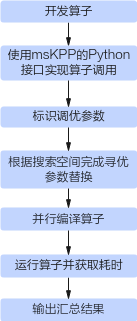
The auto-tuning workflow includes two types: Kernel-level autotuning and Application-level autotuning. For the specific workflow, refer to Figure 1. For detailed operations, refer to Kernel-level Autotuning Example and Application-level Autotuning Example.
Figure 1 Auto-tuning workflow diagram
Kernel-level Auto-tuning Example
This chapter uses the examples/00_basic_matmul from the catlass-v1-dev branch of the template library as an example to introduce how to use the interfaces provided by the msKL tool to implement kernel-level auto-tuning.
[!NOTE] Note
If any exception occurs during execution, you can view debug logs and retain intermediate files by setting environment variables to facilitate problem locating.
-
After completing the kernel operator development, the definition and implementation of the kernel function will be presented in the basic_matmul.cpp file, as shown below.
-
Refer to the appendix and create a Python script file basic_matmul_autotune.py and a build script file jit_build.sh in the
examples/00_basic_matmuldirectory.Define the Python interface for the operator's Kernel function according to the following requirements: Define the
basic_matmulfunction in the Python script, and its input parameters must be consistent with the Kernel function in the C++ code.# basic_matmul_autotune.py import mskl def get_kernel(): kernel_file = ".basic_matmul.cpp" kernel_name = "BasicMatmul" build_script = "./jit_build.sh" # kernel compile script config = mskl.KernelInvokeConfig(kernel_file, kernel_name) gen_file = mskl.Launcher(config).code_gen() kernel = mskl.compile(build_script=build_script, launch_src_file=gen_file) return kernel def basic_matmul(problem_shape, a, layout_a, b, layout_b, c, layout_c): # This function's input arguments must exactly match the kernel function. kernel = get_kernel() blockdim = 20 # use the correct aic number that matches your hardware return kernel[blockdim](problem_shape, a, layout_a, b, layout_b, c, layout_c, device_id=1) # invoke the kernel -
Refer to the following code implementation to construct the kernel input parameters and ensure the normal execution of the
basic_matmulfunction.- If the input parameter of the operator's Kernel function is
GM_ADDR, use thenumpy.arraytype to construct the input parameter. - If the input parameter of the operator Kernel function is a C++ struct object, you need to use ctypes.Structure to construct an identical struct in Python.
# basic_matmul_autotune.py import numpy as np from ctypes import Structure, c_uint32, c_int32, c_int64 class GemmCoord(Structure): _fields_ = [("m", c_uint32), ("n", c_uint32), ("k", c_uint32)] def __init__(self, m, n, k): super().__init__() self.m = (c_uint32)(m) self.n = (c_uint32)(n) self.k = (c_uint32)(k) @staticmethod def get_namespace(): return "Catlass::" class RowMajor(Structure): _fields_ = [("shape", c_int32 * 2), ("stride", c_int64 * 2)] def __init__(self, rows : int = 0, cols : int = 0, ldm : int = None): super().__init__() self.shape = (c_int32 * 2)(rows, cols) if ldm is None: self.stride = (c_int64 * 2)(cols, 1) else: self.stride = (c_int64 * 2)((c_int64)(ldm), 1) @staticmethod def get_namespace(): return "Catlass::layout::" if __name__ == "__main__": m = 256 n = 512 k = 1024 problem_shape = GemmCoord(m, n, k) layout_a = RowMajor(m, k) layout_b = RowMajor(k, n) layout_c = RowMajor(m, n) a = np.random.randint(1, 2, [m, k]).astype(np.half) b = np.random.randint(1, 2, [k, n]).astype(np.half) c = np.zeros([m, n]).astype(np.half) basic_matmul(problem_shape, a, layout_a, b, layout_b, c, layout_c) # check if the output tensor c is consistent with the golden data golden = np.matmul(a, b) is_equal = np.array_equal(c, golden) result = "success" if is_equal else "failed" print("compare {}.".format(result)) - If the input parameter of the operator's Kernel function is
-
Run the Python script. If the following prompt is displayed, it indicates that the operator Kernel can be successfully launched through the Python interface.
-
Identify the parameters to be tuned in the operator code program basic_matmul.cpp.
Use // tunable at the end of the template parameter declaration line to mark the code content after the "=" sign for replacement.
using L1TileShape = GemmShape<128, 256, 256>; // tunable
using L0TileShape = GemmShape<128, 256, 64>; // tunable
[!NOTE] Note
In addition to the tunable marking method, you can also use a line break and add // tunable: Alias (L0Shape) at the end of the code line that requires full-line replacement. The alias is used for search space indexing. -
Define the parameter search space through the
configsinput parameter of the autotune interface. Each parameter combination will replace the marked code lines in the operator kernel code, followed by compilation, execution, and kernel performance collection. An example of search space definition can be referenced as shown below.[!NOTE] Note - Parameter replacement must be reasonable and must not cause compilation or runtime errors. - The parameter replacement principles are as follows (using the first row in
configsas an example): 1. First, replace parameters marked with// tunable: L0Shape. The entire marked code line (MatmulShape<128, 256, 64>) is replaced with the value string fromconfigs(MatmulShape<128, 256, 64>). 2. Then, replace code lines marked with// tunable. TheMatmulShape<128, 256, 256>after the "=" sign is replaced with the value stringMatmulShape<64, 64, 64>fromconfigs. - In different scopes, two variables with the same name might be declared. If both variables match the replacement rule, only the first variable will be modified. - If one of the configs fails to match, the task corresponding to that config will stop and report an error. However, other successfully matched configs will proceed with parameter replacement.@mskl.autotune(configs=[ # add and try your own config here for a better kernel performance {'L1TileShape': 'GemmShape<128, 256, 256>', 'L0TileShape': 'GemmShape<128, 256, 64>'}, #0 the same config as in basic_matmul.cpp {'L1TileShape': 'GemmShape<128, 256, 128>', 'L0TileShape': 'GemmShape<128, 256, 64>'}, {'L1TileShape': 'GemmShape<128, 128, 256>', 'L0TileShape': 'GemmShape<128, 128, 64>'}, {'L1TileShape': 'GemmShape<64, 128, 128>', 'L0TileShape': 'GemmShape<64, 128, 128>'}, {'L1TileShape': 'GemmShape<64, 128, 256>', 'L0TileShape': 'GemmShape<64, 128, 128>'}, {'L1TileShape': 'GemmShape<64, 128, 512>', 'L0TileShape': 'GemmShape<64, 128, 128>'}, {'L1TileShape': 'GemmShape<64, 64, 128>', 'L0TileShape': 'GemmShape<64, 64, 128>'}, {'L1TileShape': 'GemmShape<64, 64, 256>', 'L0TileShape': 'GemmShape<64, 64, 128>'}, {'L1TileShape': 'GemmShape<64, 64, 512>', 'L0TileShape': 'GemmShape<64, 64, 128>'}, {'L1TileShape': 'GemmShape<128, 128, 128>', 'L0TileShape': 'GemmShape<128, 128, 128>'}, {'L1TileShape': 'GemmShape<128, 128, 256>', 'L0TileShape': 'GemmShape<128, 128, 128>'}, {'L1TileShape': 'GemmShape<128, 128, 512>', 'L0TileShape': 'GemmShape<128, 128, 128>'}, ], warmup=1000, repeat=10, device_ids=[0]) # set kernel warmup 1000us -
Execute the basic_matmul_autotune.py file to run the operator, obtaining the execution time for each parameter combination and the optimal tuning parameter set. The following shows only one possible command-line output result.
# python3 basic_matmul_autotune.py
No.0: 22.562μs, {'L1TileShape': 'GemmShape<128, 256, 256>', 'L0TileShape': 'GemmShape<128, 256, 64>'}
No.1: 22.109μs, {'L1TileShape': 'GemmShape<128, 256, 128>', 'L0TileShape': 'GemmShape<128, 256, 64>'}
No.2: 17.778μs, {'L1TileShape': 'GemmShape<128, 128, 256>', 'L0TileShape': 'GemmShape<128, 128, 64>'}
No.3: 15.378μs, {'L1TileShape': 'GemmShape<64, 128, 128>', 'L0TileShape': 'GemmShape<64, 128, 128>'}
No.4: 14.982μs, {'L1TileShape': 'GemmShape<64, 128, 256>', 'L0TileShape': 'GemmShape<64, 128, 128>'}
No.5: 15.671μs, {'L1TileShape': 'GemmShape<64, 128, 512>', 'L0TileShape': 'GemmShape<64, 128, 128>'}
No.6: 19.592μs, {'L1TileShape': 'GemmShape<64, 64, 128>', 'L0TileShape': 'GemmShape<64, 64, 128>'}
No.7: 18.340μs, {'L1TileShape': 'GemmShape<64, 64, 256>', 'L0TileShape': 'GemmShape<64, 64, 128>'}
No.8: 18.541μs, {'L1TileShape': 'GemmShape<64, 64, 512>', 'L0TileShape': 'GemmShape<64, 64, 128>'}
No.9: 20.652μs, {'L1TileShape': 'GemmShape<128, 128, 128>', 'L0TileShape': 'GemmShape<128, 128, 128>'}
No.10: 17.728μs, {'L1TileShape': 'GemmShape<128, 128, 256>', 'L0TileShape': 'GemmShape<128, 128, 128>'}
No.11: 17.637μs, {'L1TileShape': 'GemmShape<128, 128, 512>', 'L0TileShape': 'GemmShape<128, 128, 128>'}
Best config: No.4
compare success.
By comparison, No.4 is the optimal tuning parameter set.
Application-level Auto-tuning Example
This chapter uses examples/00_basic_matmul from the master branch of the template library as an example to introduce how to use the interfaces provided by the msKL tool to implement application-level auto-tuning.
[!NOTE] Note
If any exception occurs during operation, you can view debug logs and retain intermediate files by setting environment variables to facilitate problem locating.
-
Refer to the examples/00_basic_matmul example, use the template library's Device layer API to implement the operator, and add the // tunable comment at the end of lines 115 and 117 respectively to replace the code content after the "=" sign.
-
Create the Python script file basic_matmul_executable_autotune.py and the build script file jit_build_executable.sh in the examples/00_basic_matmul directory.
You can modify the configs parameter passed to the autotune_v2 interface in the basic_matmul_executable_autotune.py script as needed to search for custom tiling parameter combinations.
Output Description
Run the Python script basic_matmul_executable_autotune.py to obtain the execution time for each parameter combination and the optimal tuning parameter set. The following shows only one possible command line output result.
# python3 basic_matmul_executable_autotune.py
No.0: 64.081 us, {'L1TileShape': 'GemmShape<128, 256, 256>', 'L0TileShape': 'GemmShape<128, 256, 64>'}
No.1: 68.041 us, {'L1TileShape': 'GemmShape<256, 128, 256>', 'L0TileShape': 'GemmShape<256, 128, 64>'}
No.2: 60.701 us, {'L1TileShape': 'GemmShape<128, 128, 256>', 'L0TileShape': 'GemmShape<128, 128, 64>'}
No.3: 61.121 us, {'L1TileShape': 'GemmShape<128, 128, 512>', 'L0TileShape': 'GemmShape<128, 128, 64>'}
No.4: 62.361 us, {'L1TileShape': 'GemmShape<64, 256, 128>', 'L0TileShape': 'GemmShape<64, 256, 64>'}
No.5: 60.661 us, {'L1TileShape': 'GemmShape<64, 256, 256>', 'L0TileShape': 'GemmShape<64, 256, 64>'}
No.6: 58.261 us, {'L1TileShape': 'GemmShape<64, 128, 256>', 'L0TileShape': 'GemmShape<64, 128, 64>'}
No.7: 62.381 us, {'L1TileShape': 'GemmShape<128, 128, 256>', 'L0TileShape': 'GemmShape<128, 128, 128>'}
No.8: 62.621 us, {'L1TileShape': 'GemmShape<128, 128, 512>', 'L0TileShape': 'GemmShape<128, 128, 128>'}
No.9: 57.501 us, {'L1TileShape': 'GemmShape<64, 128, 256>', 'L0TileShape': 'GemmShape<64, 128, 128>'}
No.10: 59.281 us, {'L1TileShape': 'GemmShape<64, 128, 512>', 'L0TileShape': 'GemmShape<64, 128, 128>'}
No.11: 65.041 us, {'L1TileShape': 'GemmShape<128, 64, 512>', 'L0TileShape': 'GemmShape<128, 64, 128>'}
No.12: 63.561 us, {'L1TileShape': 'GemmShape<64, 64, 256>', 'L0TileShape': 'GemmShape<64, 64, 256>'}
No.13: 65.121 us, {'L1TileShape': 'GemmShape<64, 64, 512>', 'L0TileShape': 'GemmShape<64, 64, 256>'}
No.14: 65.081 us, {'L1TileShape': 'GemmShape<64, 64, 1024>', 'L0TileShape': 'GemmShape<64, 64, 256>'}
Best config: No.9
autotune results saved in MSKL_AUTOTUNE_RESULTS_20250604195710.csv
By comparison, No.9 is the optimal tuning parameter set.
Appendix
basic_matmul_autotune.py
import numpy as np
from ctypes import Structure, c_uint32, c_int32, c_int64
import mskl

def get_kernel():
    kernel_file = "./basic_matmul.cpp"
    kernel_name = "BasicMatmul"
    build_script = "./jit_build.sh" # kernel compile script
    config = mskl.KernelInvokeConfig(kernel_file, kernel_name)
    gen_file = mskl.Launcher(config).code_gen()
    kernel = mskl.compile(build_script=build_script, launch_src_file=gen_file)
    return kernel

"""
To enable the autotune feature, it is required to add the "// tunable" marker to
the code lines in "basic_matmul.cpp", e.g.
    ...
    51    using L1TileShape = GemmShape<128, 256, 256>; // tunable
    52    using L0TileShape = GemmShape<128, 256, 64>; // tunable
"""
@mskl.autotune(configs=[
    {'L1TileShape': 'GemmShape<128, 256, 256>', 'L0TileShape': 'GemmShape<128, 256, 64>'}, #0 the same config as in basic_matmul.cpp
    {'L1TileShape': 'GemmShape<128, 256, 128>', 'L0TileShape': 'GemmShape<128, 256, 64>'},
    {'L1TileShape': 'GemmShape<128, 128, 256>', 'L0TileShape': 'GemmShape<128, 128, 64>'},
    {'L1TileShape': 'GemmShape<64, 128, 128>', 'L0TileShape': 'GemmShape<64, 128, 128>'},
    {'L1TileShape': 'GemmShape<64, 128, 256>', 'L0TileShape': 'GemmShape<64, 128, 128>'},
    {'L1TileShape': 'GemmShape<64, 128, 512>', 'L0TileShape': 'GemmShape<64, 128, 128>'},
    {'L1TileShape': 'GemmShape<64, 64, 128>', 'L0TileShape': 'GemmShape<64, 64, 128>'},
    {'L1TileShape': 'GemmShape<64, 64, 256>', 'L0TileShape': 'GemmShape<64, 64, 128>'},
    {'L1TileShape': 'GemmShape<64, 64, 512>', 'L0TileShape': 'GemmShape<64, 64, 128>'},
    {'L1TileShape': 'GemmShape<128, 128, 128>', 'L0TileShape': 'GemmShape<128, 128, 128>'},
    {'L1TileShape': 'GemmShape<128, 128, 256>', 'L0TileShape': 'GemmShape<128, 128, 128>'},
    {'L1TileShape': 'GemmShape<128, 128, 512>', 'L0TileShape': 'GemmShape<128, 128, 128>'},
], warmup=1000, repeat=10, device_ids=[1])
def basic_matmul(problem_shape, a, layout_a, b, layout_b, c, layout_c):
    # This function's input arguments must exactly match the kernel function.
    kernel = get_kernel()
    blockdim = 20 # use the correct aic number that matches your hardware
    return kernel[blockdim](problem_shape, a, layout_a, b, layout_b, c, layout_c, device_id=1) # invoke the kernel

class GemmCoord(Structure):
    _fields_ = [("m", c_uint32),
                ("n", c_uint32),
                ("k", c_uint32)]
    def __init__(self, m, n, k):
        super().__init__()
        self.m = (c_uint32)(m)
        self.n = (c_uint32)(n)
        self.k = (c_uint32)(k)
    @staticmethod
    def get_namespace():
        return "Catlass::"

class RowMajor(Structure):
    _fields_ = [("shape", c_int32 * 2),
                ("stride", c_int64 * 2)]
    def __init__(self, rows : int = 0, cols : int = 0, ldm : int = None):
        super().__init__()
        self.shape = (c_int32 * 2)(rows, cols)
        if ldm is None:
            self.stride = (c_int64 * 2)(cols, 1)
        else:
            self.stride = (c_int64 * 2)((c_int64)(ldm), 1)
    @staticmethod
    def get_namespace():
        return "Catlass::layout::"

if __name__ == "__main__":
    # prepare kernel input/output
    m = 256
    n = 512
    k = 1024
    problem_shape = GemmCoord(m, n, k)
    layout_a = RowMajor(m, k)
    layout_b = RowMajor(k, n)
    layout_c = RowMajor(m, n)
    a = np.random.randint(1, 2, [m, k]).astype(np.half)
    b = np.random.randint(1, 2, [k, n]).astype(np.half)
    c = np.zeros([m, n]).astype(np.half)

    # invoke kernel
    basic_matmul(problem_shape, a, layout_a, b, layout_b, c, layout_c)

    # check if the output tensor c is consistent with the golden data
    golden = np.matmul(a, b)
    is_equal = np.array_equal(c, golden)
    result = "success" if is_equal else "failed"
    print("compare {}.".format(result))
jit_build.sh
#!/bin/bash
# default input file
LAUNCH_SRC_FILE="_gen_launch.cpp"
OUTPUT_LIB_FILE="_gen_module.so"
if [ $# -ge 1 ] ; then
    LAUNCH_SRC_FILE=$1
fi
if [ $# -ge 2 ]; then
    OUTPUT_LIB_FILE=$2
fi
LAUNCH_OBJ_FILE="${LAUNCH_SRC_FILE%.cpp}.o"
PYTHON_INCLUDE=$(python3 -c "import sysconfig; print(sysconfig.get_path('include'))")
cd "$(dirname "$0")"

bisheng -O2 -fPIC -std=c++17 -xcce --cce-aicore-arch=dav-c220 \
    -DL2_CACHE_HINT \
    -mllvm -cce-aicore-stack-size=0x8000 \
    -mllvm -cce-aicore-function-stack-size=0x8000 \
    -mllvm -cce-aicore-record-overflow=true \
    -mllvm -cce-aicore-addr-transform \
    -mllvm -cce-aicore-dcci-insert-for-scalar=false \
    -I$ASCEND_HOME_PATH/compiler/tikcpp \
    -I$ASCEND_HOME_PATH/include/aclnn \
    -I$ASCEND_HOME_PATH/compiler/tikcpp/tikcfw \
    -I$ASCEND_HOME_PATH/compiler/tikcpp/tikcfw/impl \
    -I$ASCEND_HOME_PATH/compiler/tikcpp/tikcfw/interface \
    -I$ASCEND_HOME_PATH/include \
    -I$ASCEND_HOME_PATH/include/experiment/runtime \
    -I$ASCEND_HOME_PATH/include/experiment/msprof \
    -I$PYTHON_INCLUDE \
    -I../../include \
    -I../common \
    -Wno-macro-redefined -Wno-ignored-attributes \
    -L$ASCEND_HOME_PATH/lib64 \
    -lruntime -lplatform -lstdc++ -lascendcl -lm -ltiling_api -lc_sec -ldl -lnnopbase \
    $LAUNCH_SRC_FILE --shared -o $OUTPUT_LIB_FILE
exit $?
basic_matmul_executable_autotune.py
import mskl
@mskl.autotune_v2(configs=[
    {'L1TileShape': 'GemmShape<128, 256, 256>', 'L0TileShape': 'GemmShape<128, 256, 64>'}, #0 the same config as in basic_matmul.cpp
    {'L1TileShape': 'GemmShape<256, 128, 256>', 'L0TileShape': 'GemmShape<256, 128, 64>'},
    {'L1TileShape': 'GemmShape<128, 128, 256>', 'L0TileShape': 'GemmShape<128, 128, 64>'},
    {'L1TileShape': 'GemmShape<128, 128, 512>', 'L0TileShape': 'GemmShape<128, 128, 64>'},
    {'L1TileShape': 'GemmShape<64, 256, 128>', 'L0TileShape': 'GemmShape<64, 256, 64>'},
    {'L1TileShape': 'GemmShape<64, 256, 256>', 'L0TileShape': 'GemmShape<64, 256, 64>'},
    {'L1TileShape': 'GemmShape<64, 128, 256>', 'L0TileShape': 'GemmShape<64, 128, 64>'},
    {'L1TileShape': 'GemmShape<128, 128, 256>', 'L0TileShape': 'GemmShape<128, 128, 128>'},
    {'L1TileShape': 'GemmShape<128, 128, 512>', 'L0TileShape': 'GemmShape<128, 128, 128>'},
    {'L1TileShape': 'GemmShape<64, 128, 256>', 'L0TileShape': 'GemmShape<64, 128, 128>'},
    {'L1TileShape': 'GemmShape<64, 128, 512>', 'L0TileShape': 'GemmShape<64, 128, 128>'},
    {'L1TileShape': 'GemmShape<128, 64, 512>', 'L0TileShape': 'GemmShape<128, 64, 128>'},
    {'L1TileShape': 'GemmShape<64, 64, 256>', 'L0TileShape': 'GemmShape<64, 64, 256>'},
    {'L1TileShape': 'GemmShape<64, 64, 512>', 'L0TileShape': 'GemmShape<64, 64, 256>'},
    {'L1TileShape': 'GemmShape<64, 64, 1024>', 'L0TileShape': 'GemmShape<64, 64, 256>'},
], warmup_times=10)
def run_executable(m, n, k, device_id):
    kernel_file = "../../00_basic_matmul/basic_matmul.cpp"
    build_script = "jit_build_executable.sh" # executable compile script
    executable = mskl.compile_executable(build_script=build_script, src_file=kernel_file, use_cache=False)
    return executable(m, n, k, device_id)
if __name__ == "__main__":
    m = 256
    n = 512
    k = 1024
    device_id = 0
    run_executable(m, n, k, device_id)
jit_build_executable.sh
#!/bin/sh
# default input file
LAUNCH_SRC_FILE="_gen_launch.cpp"
# OUTPUT_LIB_FILE="_gen_module.so"
OUTPUT_LIB_FILE="_gen_executable"
if [ $# -ge 1 ] ; then
    LAUNCH_SRC_FILE=$1
fi
if [ $# -ge 2 ]; then
    OUTPUT_LIB_FILE=$2
fi
LAUNCH_OBJ_FILE="${LAUNCH_SRC_FILE%.cpp}.o"
PYTHON_INCLUDE=$(python3 -c "import sysconfig; print(sysconfig.get_path('include'))")
cd "$(dirname "$0")"
bisheng -O2 -std=c++17 -xcce --cce-aicore-arch=dav-c220 \
    -mllvm -cce-aicore-stack-size=0x8000 \
    -mllvm -cce-aicore-function-stack-size=0x8000 \
    -mllvm -cce-aicore-record-overflow=true \
    -mllvm -cce-aicore-addr-transform \
    -mllvm -cce-aicore-dcci-insert-for-scalar=false \
    -DL2_CACHE_HINT \
    -I$ASCEND_HOME_PATH/compiler/tikcpp \
    -I$ASCEND_HOME_PATH/include/aclnn \
    -I$ASCEND_HOME_PATH/compiler/tikcpp/tikcfw \
    -I$ASCEND_HOME_PATH/compiler/tikcpp/tikcfw/impl \
    -I$ASCEND_HOME_PATH/compiler/tikcpp/tikcfw/interface \
    -I$ASCEND_HOME_PATH/include \
    -I$ASCEND_HOME_PATH/include/experiment/runtime \
    -I$ASCEND_HOME_PATH/include/experiment/msprof \
    -I../../../include \
    -I../../common \
    -L${ASCEND_HOME_PATH}/lib64 \
    -Wno-macro-redefined -Wno-ignored-attributes \
    -lruntime -lstdc++ -lascendcl -lm -ltiling_api -lplatform -lc_sec -ldl -lnnopbase \
    $LAUNCH_SRC_FILE -o $OUTPUT_LIB_FILE
exit $?